Getting and Using Clickers
About the Clickers
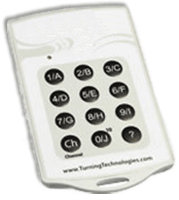
The TurningPoint "Clickers" are a light-weight card used to send responses to questions on a presentation. You can enter multiple choice answers as numbers or letters.
Responses will be shown in the PowerPoint presentation. All responses are anonymous.
Getting clickers for BBA-core and first-year MBA students
Students registered for BA200, as well as first-year fulltime MBA students, are issued a Clicker at the start of the Fall term at orientation. Clickers can be returned to the Technology Concierge desk at the end of the academic year.
Getting clickers for non-core and non-MBA classes
Computing Services has Clickers available for loan on a per-class basis. Request the Clickers by sending an email to RossClassroomSupport@umich.edu. There are a limited number available, so be certain to give as much advance notice as you can.
How the Clickers Work
The "Clicker" uses two CR2032 (3.0V) Lithium Batteries with an average battery life of 6 to 12 months. The card has 12 keys, 1/A-10/J, 'Ch' and '?', which are used to automatically transmit responses.
Responses by the clickers are transmitted to a Receiver that plugs in via USB to the presenting computer. The clickers and receiver have to be set to the same channel to work together. Receivers checked out from Computing Services have their channel labeled on the receiver itself, so simply have your audience change their clicker's channel at the start of the presentation. This is done by having them press "Ch," and then entering in the receiver's channel number (01 for Channel 1, 02 for Channel 2, and so on). When the light flashes green, the clicker is now set to that channel.
Last Updated on May 10, 2025